Mamma's Chef

Free and open source

Less time planning. More time around the table.

A free, open-source AI meal planner for busy families with little ones, running on your own computer. Get a week of well-seasoned meals, a shopping list you can actually shop from, and leftovers planned into later meals.

A family-style dinner table seen from above, with grilled steak and vegetables, roasted potatoes, salads, bread and lemonade

Why we built it

Made by two working parents

We're a busy family with young kids, and Mamma's Chef started because my wife needed help planning the week's meals. The meal planners we found seemed to be made by people who didn't have toddlers or busy jobs, so we built our own.

Two problems shaped it. AI recipes kept coming out bland, so a lot of our early work went into teaching it to season food properly. And AI shopping lists asked for things like one clove of garlic, which no store sells, so the app now turns recipes into a list you can actually shop from.
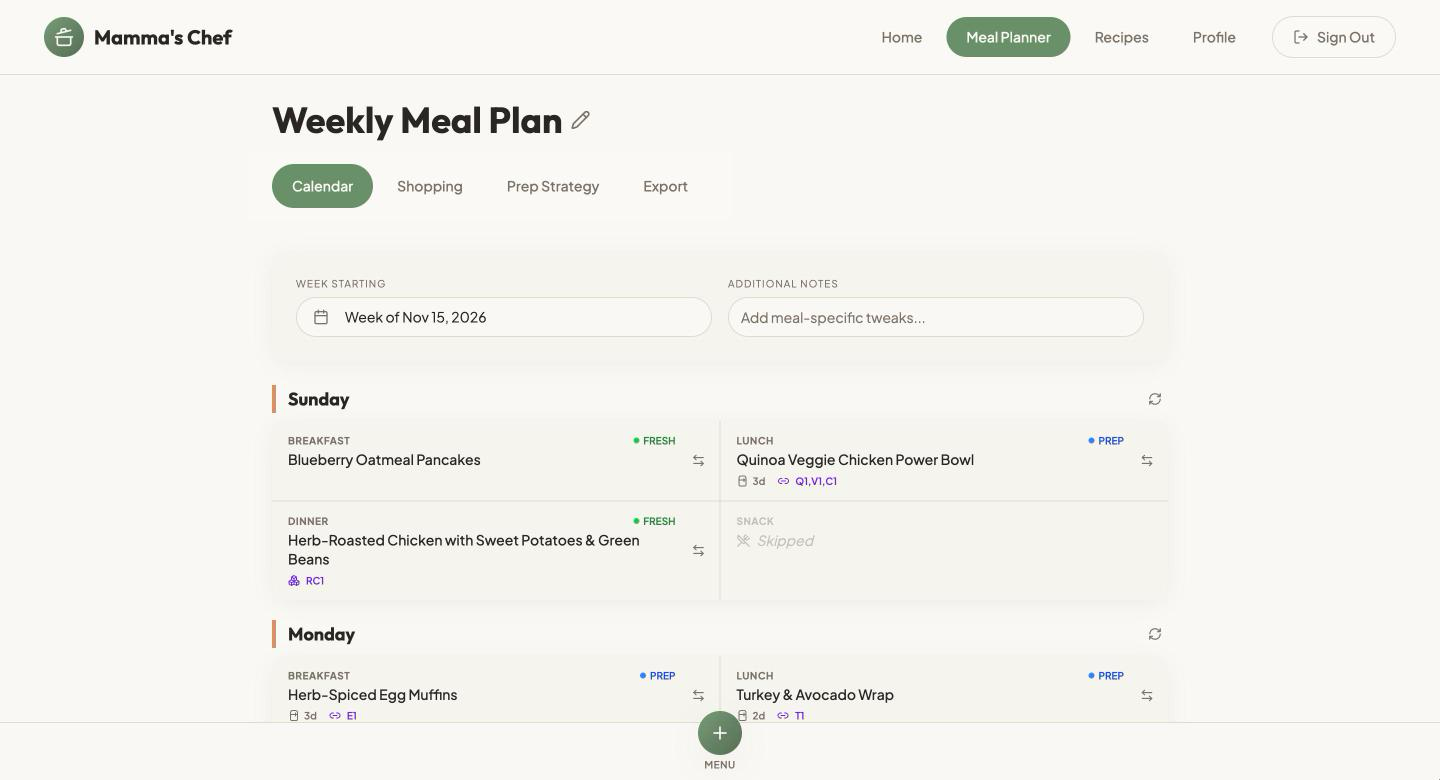
The weekly meal plan view in Mamma's Chef, with breakfast, lunch and dinner for each day
The weekly plan view. Swap a meal or regenerate a whole day from here.

Flavor first

Food your whole family will eat

Every recipe is written to a seasoning standard, with layered herbs and spices and steps specific enough to follow. The AI is told to use at least three seasonings beyond salt, pepper and oil, and each plan is checked against that rule.

Each recipe also carries a flavor note. Turn on the toddler option and every meal gets a tip for little ones. From a real plan:

Herb-crusted chicken thighs with lemon-garlic quinoa. “Smoky paprika and herb crust gives a warm depth while lemon-garlic quinoa adds bright, fresh contrast.”
Toddler tip: “Shred the chicken off the bone into bite-size pieces and serve with soft quinoa so it's easy to scoop with a fork.”

Practical shopping

A list you can shop from

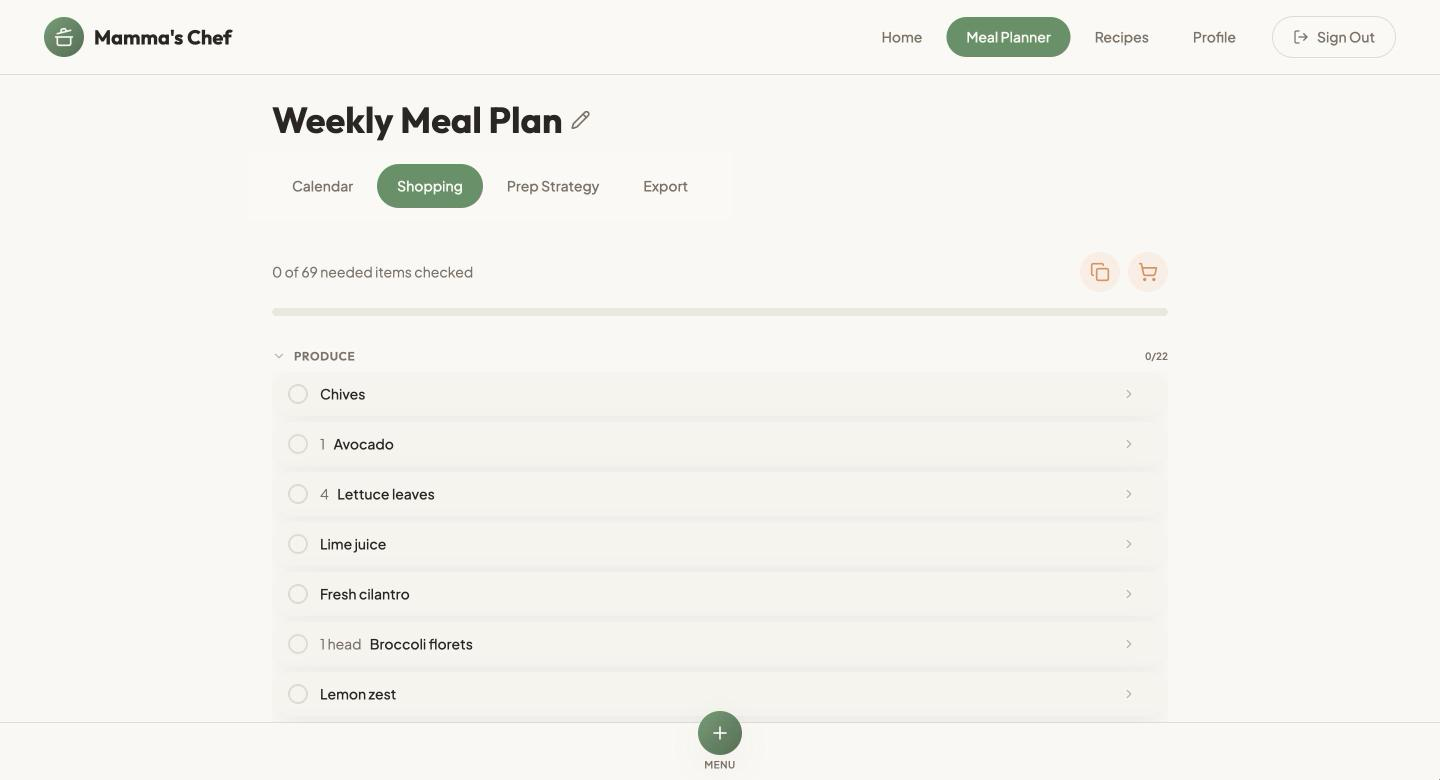
Recipes ask for cloves and tablespoons. Stores sell heads and bunches. The app adds up every meal in the week and turns it into what you actually buy. From the same real plan:

Recipe amounts compared with the shopping list
The recipes ask forYour list says
1, 2, 2, 2, 4 and 4 cloves of garlic, in 6 meals2 heads garlic
2, 2 and 1 tablespoons of cilantro, in 3 meals1 bunch cilantro
A pinch of this and a teaspoon of thatListed once as a pantry item, no amount

Everything is grouped by aisle, and items already in your pantry are left off.

Cook once, eat twice

Your week is planned as one connected kitchen

Most meal planners treat every meal on its own. Mamma's Chef plans how food carries forward through the week, so the dinner you cook on Monday feeds your lunch on Tuesday, and an hour of prep on Sunday covers meals until Thursday.

Mon dinnerRoast chicken thighsMakes extraShredded chicken, fridge, use by WedTue lunchChicken grain bowlsWed dinnerChicken quesadillas
Sun prepCook a big pot of riceBatchCooked rice, fridge, use by ThuMon lunchVeggie fried riceThu dinnerStuffed peppers

Planned leftovers

Every batch says how much it makes, how to store it and when to use it by, so nothing goes to waste in the back of the fridge.

See where food goes

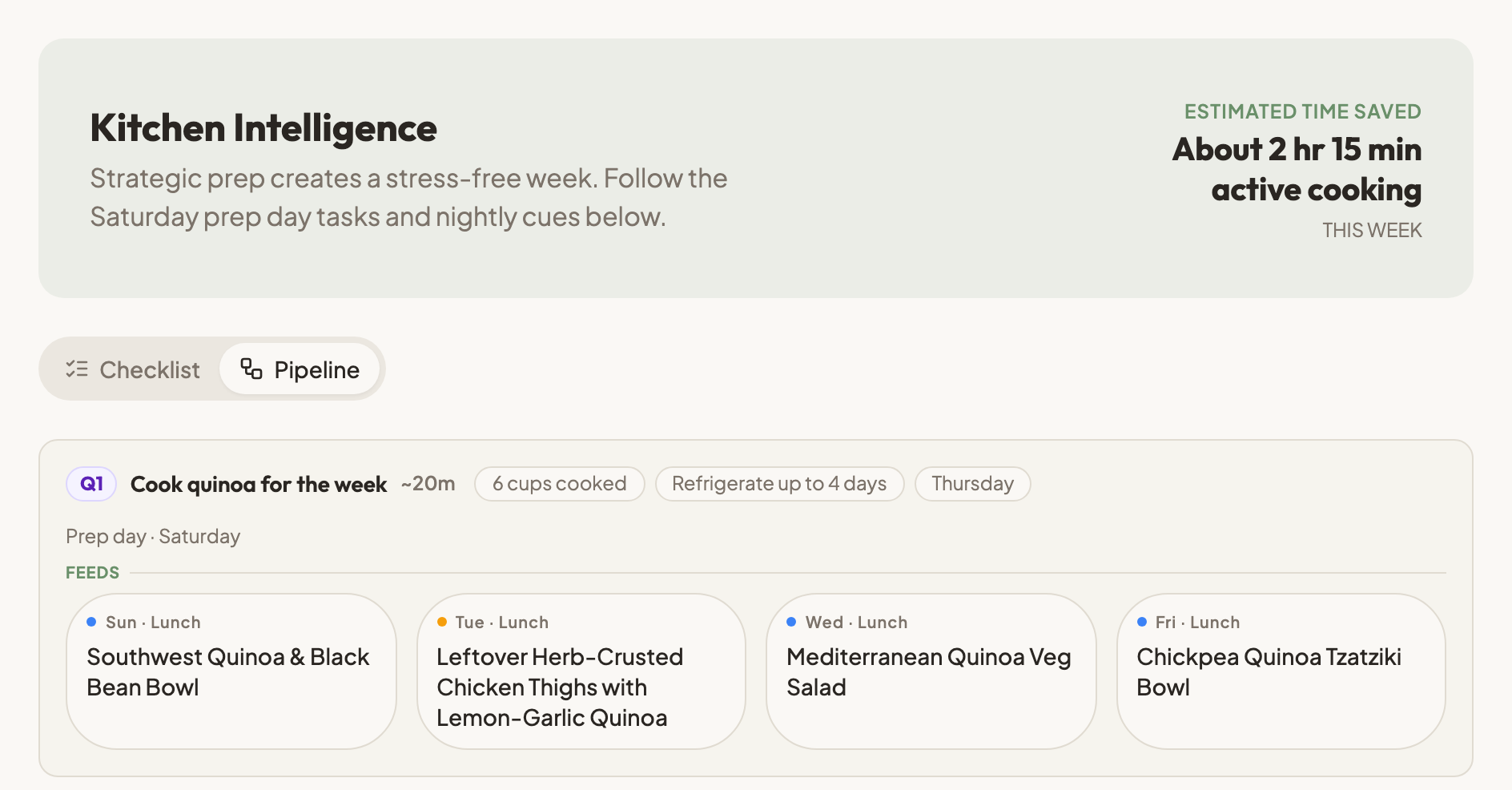
The Pipeline view follows each batch from the meal that makes it to every meal that uses it. The Prep Strategy tab also estimates how much cooking time you save.

Swaps stay connected

Swap the meal that makes a batch, and the meals that ate its leftovers switch to the new meal's leftovers.

The Pipeline view in the Prep Strategy tab. About 2 hours 15 minutes of active cooking saved this week. A Saturday prep batch of 6 cups of quinoa feeds lunches on Sunday, Tuesday, Wednesday and Friday, including leftover herb-crusted chicken thighs with lemon-garlic quinoa.
The Pipeline view from a real plan. One Saturday pot of quinoa feeds four lunches.

You also get a prep-day checklist and a night-before routine for the week.

What it does

Plan from what you have

Start from a pantry photo, a typed request, your favourite recipes, or any mix of the three.

Change one thing

Swap a single meal or regenerate a whole day, and leave the rest of the week alone.

Recipe library

Browse recipes, add your own custom recipes, and save favourites to pin into future plans.

Print and export

Save a plan as a PDF, add meals to your calendar as an .ics file, or download a CSV spreadsheet.

A shopping list grouped by aisle
Shopping list, grouped by aisle.
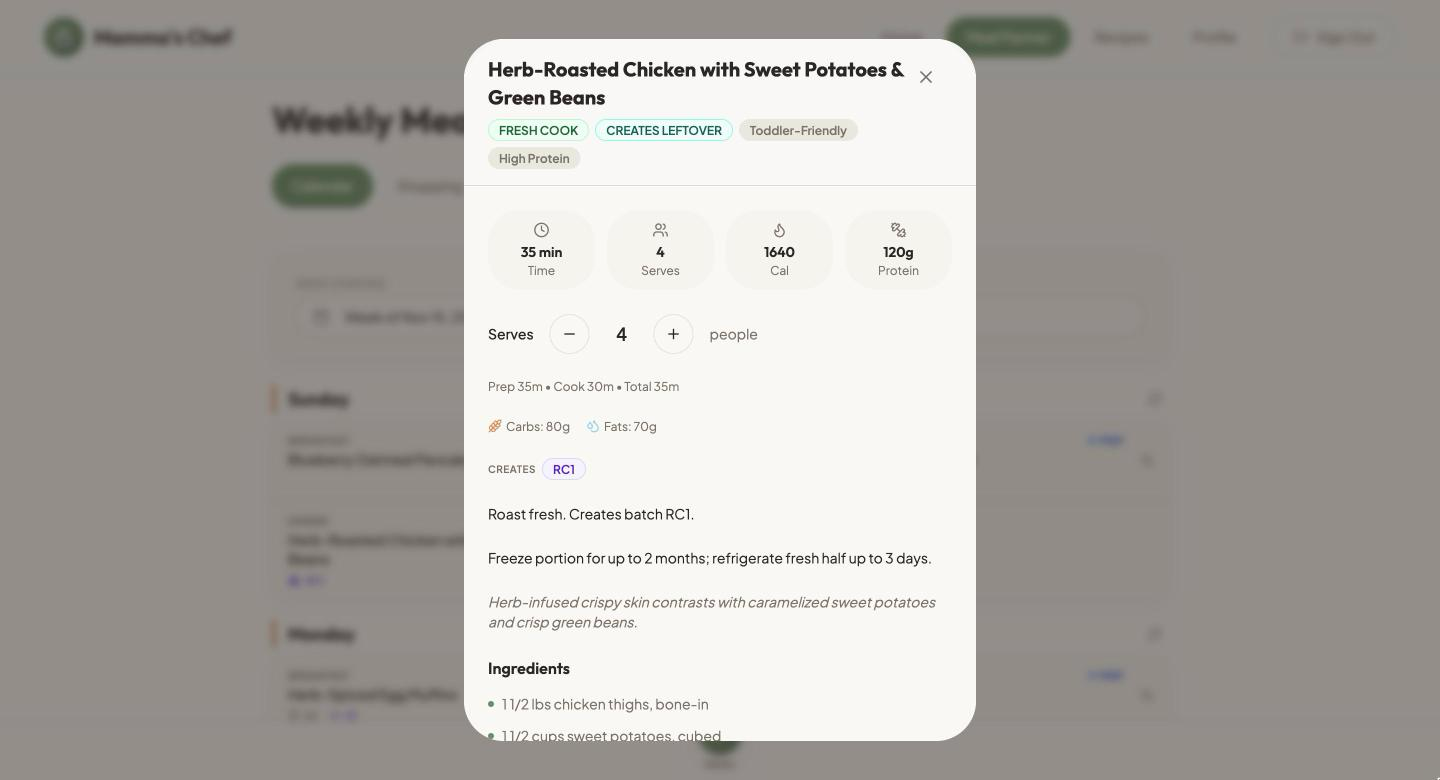
A recipe with ingredients, steps and nutrition details
A recipe with steps, calories and macros, plus toddler and glucose tips.

Install

You need three things:

  • Node.js 20 or newer
  • Docker Desktop, running
  • An API key from an AI provider. You pay that provider for what you use.
git clone https://github.com/PreillySMP/mammas-chef.git
cd mammas-chef
npm run setup

The first run downloads the database containers and can take several minutes.

  1. Open supabase/functions/.env and add your AI key.
  2. Run npm start.
  3. Open http://localhost:8080 and create an account. It only exists on your computer, and no confirmation email is sent.

Which AI providers work

Cerebras is the one the app was built and tuned on, and the only one tested end to end. OpenAI and other OpenAI-compatible services use the same request format but have not generated a full plan yet, and results may be weaker. A model has to return long, well-formed JSON, and small local models often cannot.

For developers and AI agents

The mammaschef command plans meals from the terminal. It uses the same database, account and AI key as the website. Every command takes --json, and edits save right away.

mammaschef plan "plan next week, quick dinners, we have rice and spinach"
mammaschef show latest
mammaschef swap latest tuesday dinner "something faster"
mammaschef regen latest thursday
mammaschef shopping latest

Run mammaschef help for every command. mammaschef mcp runs a local MCP server over stdio. To add it to Claude Code:

claude mcp add mammaschef -- mammaschef mcp

Claude Code is the agent tested so far. Other agents, including OpenClaw and Hermes, have not been tested. The Grok app is not supported. See the README for the setup steps that come first, such as npm link.

Built with React, Vite, Tailwind and Supabase.

Honest limits

  • Allergy checks are a safety net, not a guarantee. The app tells the AI what to avoid, scans each plan for allergen keywords, and can ask a second AI model for an opinion. The AI still suggests foods you asked it to avoid. In testing, a plan for a sesame allergy included hummus.
  • The keyword scan only knows the words on its list, so a meal with no warning can still contain an allergen. The second-opinion check needs a Vercel AI Gateway key and is skipped without one.
  • Always read every recipe, ingredient and label yourself. This is not medical advice.
  • Privacy: your database stays on your computer, but meal requests and household details, including allergies, are sent to the AI provider you choose. If you connect an AI agent, what it reads also goes to that agent's provider.
  • Only Cerebras is tested end to end.
  • This is early software, version 0.1.0, maintained by one person in their spare time. Replies to issues and pull requests may take a few days.
  • Each account can generate 10 plans and swap 20 meals a day. You can change the limits in supabase/functions/_shared/rateLimit.ts.
  • It is built for personal use on your own computer, not for the public internet.

Contribute

This is a small project, and the most useful help right now is testing it in places we can't. Pick one of these open issues:

Widening allergy-check coverage and improving the docs are welcome too.

Used the hosted app?

The hosted app no longer runs at mammaschef.ai, which is now this page. The same app is free to run yourself, and the steps are in Install. Plans saved in the hosted app cannot be carried over.